Smokin' hot deal: SmallHD offers $300 off their DP6 monitor

I’ve been loving my SmallHD DP6 monitor since I got it last December. It’s literally changed the way I shoot. Suddenly, I can see whether I’m in focus while I’m shooting instead of afterward when I’m reviewing footage. It’s a miracle.

And today they’re running a special offer of $300 off (that’s 33 percent) the HDMI version of the monitor (I’ve got the version that includes SDI connectors, but this one is just as good if you shoot exclusively on DSLRs or other cameras with HDMI ports and don’t need SDI out).

Also, this deal is good for free shipping, and they’ve added a 48-hour, no-questions return policy. If you’ve ever wanted one of these, and you should if you haven’t, today’s the day to buy one.

To take advantage of this offer, you simply have to like SmallHD’s new fan page on Facebook: facebook.com/SmallHD

New series on innovative businesses in Seattle launches today

We’ve teamed up with Biznik to produce a series of short videos spotlighting innovative businesses and thinkers in Seattle. The first installment launched over the weekend, featuring a local cabinet making company.

Lisa and I are producing these videos quickly (one day of shooting and editing completed within a few days), but without sacrificing too much on quality (you won’t see any shaky handheld camera work in our stuff, for example). Everything done with a crew of two, and all the gear we can stuff into a Nissan Leaf. Lisa directs and produces; I shoot and edit. Although Lisa also did a fair bit of b-roll shooting on this as well.

For this piece we used four lights – a Smith Victor 650-watt open-face light through a medium soft box for the interview with Lowel Pro-light for rim light; and a pair of CN-900 LED lite panels for lighting him in his office. The rest was all shot with available light in the well-lit factory.

It was also the first piece on which I got a chance to use my new Sennheiser 8060 shotgun mic, and it’s a dandy. Jeff’s voice comes through really rich and warm and needed very little EQ adjustment in post (just added a tiny bit on the high end in a few of the clips to get them to match). Everything they say about this mic is true: it makes whoever’s talking sound great, is tuned to bring forward human speech from the environment, and rejects sound from the sides without coloration. What more can I say? Oh, it’s tiny, light, and will probably last for 20 years.

We’re ramping up to do a lot of these in coming days and excited about the challenge of making business videos that are easy to watch and ultimately inspiring.

Final Cut Pro X v. 10.0.3: hello multicam

Multicam Editing in Final Cut Pro X

Apple has released a new version of Final Cut Pro X this morning, and it’s got something a lot of editors have been waiting for: built-in support for multiple camera angles. I’ve been getting by just fine by combining multiple angles into a compound clip, and slicing out from there. But I’m looking forward to trying this out.

But the main thing I’m excited about is what Apple calls improvements in “overall stability and performance.” The big issue for me, which causes me to reboot daily, is that when I’m skipping back and forth between timeline and event library, sooner or later my skimmer vanishes in the timeline and the only way to get it back is to restart FCPX. I’m hoping display bugs like that are a thing of the past in this new version. I’ll be cutting all day on Beyond Naked, so will post an update this afternoon.

My favorite filmmaking tool of 2011: Nissan Leaf

As a filmmaker, I get a kick from working with well-designed, cutting edge technology. I’ve had the opportunity to use some amazing stuff over the past year: Tab Firchau’s RC helicopter, gyro-stabilized camera mounts, and the incredible Sennheiser 8060 mic. But nothing has had a bigger impact on the way I make films than the Nissan Leaf that Lara and I purchased in August. I use it on EVERY shoot. It carries everything I need. It’s sexy. It’s fun. It’s silent. It uses ZERO gas.

But what’s even more amazing, is that it’s the first car I’ve ever owned that I actually enjoy driving. The visceral enjoyment comes from it’s quiet, push-you-into-your-seat acceleration. It’s a trip to be sitting at a stop light next to another car and when the light changes, to leap from a dead stop to 30 mph – silently. The intellectual enjoyment comes from knowing that the oil and gas industry gets ZERO of my dollars, and the environment gets ZERO emissions. And because I live in Seattle, where in excess of 90 percent of our power is generated from hydro, I’m driving a car that is almost literally powered by the rain.

Since August, we’ve seen an increase in our monthly electric bill that will equate to about $200/year. By comparison, we were paying $200/month to fuel our Jeep Cherokee, before we traded it in for the Leaf. The Leaf doesn’t have nearly the cargo capacity of the Jeep, but with careful packing, it’s proven big enough for my current productions. And so far at least, none of my projects has taken me beyond the 100 mile range of the Leaf. If it does, our Nissan dealer offers Leaf owners a deep discount on SUV rental. And it won’t be that much longer before the first SUV-sized EVs hit the market (such as the Toyota RAV-4 EV or the Tesla Model X, due to be announced in first quarter of 2012).

Red carpet treatment: Free EV chargers are starting to appear, and commercial ones too. Our local Fred Meyer has just installed two Blink EV charging stations, right next to handicapped parking. So now it’s like I’ve got my own parking spot reserved every time I go pick up groceries.

Wish list: One thing that filmmakers never have enough of is power. It’s easy to blow breakers by plugging too many tungsten lights onto a circuit. And on location outdoors, it’s sometimes necessary to carry a noisy generator to get the power necessary to run hot lights. But with a car like the Leaf, which is basically a giant battery on wheels, shouldn’t it be possible to get power flowing OUT of the car? Yes. But no one has come up with a hack to tap it, yet. Nissan has announced plans to sell a device that converts the Leaf into an emergency power supply for a home, but it’s the size of a small refrigerator. I’m sure contractors and others who use large amounts of power at remote locations would be very interested in a small, portable power tap for the Leaf. I’m hopeful somebody will give me a chance to buy one in 2012.

After 5 months with the Leaf, it’s clear to me that the future of filmmaking – and driving – belongs to electricity.

Fast glass: Why they call it a nifty fifty

Holiday lights take an otherwise ordinary shot into another dimension when shot with my old Nikon 50mm f1.4 lens, shot wide open. I captured this slice of holiday happy just before the family sat down to dinner yesterday at our family gathering in Bellevue. I like it so much that I’m heading to the Bellevue Botanical Garden tonight with my Glidetrack to have a go at shooting some of the over-the-top lights there, to use for who-knows what: backgrounds, abstract video compositing, whatever. Or maybe just because it’s pretty.

All I want for Christmas is a Sennheiser 8060

I can hardly believe what Santa brought me this year: a Sennheiser 8060. It’s a mic that I’ve coveted ever since it hit the market six months ago, becoming the instant industry standard shotgun mic for well-financed film and TV productions with it’s nearly $1,300 price tag. My productions aren’t exactly well financed, but after today, they’re going to sound like they are.

Because it’s more important for film to sound great than it is to look great, it can make sense to spend more on a microphone than on a camera. Will this microphone be worth the money? I’ll post a full review and comparison of this mic with my AT875 and Octava MK-012 after I’ve had a chance to use it awhile.

In search of the perfect camera cart

A few weeks ago, Lisa and I are heading to a commercial shoot. We’re stressing, because we don’t know what the location is going to look like, and we’ve got just 30 minutes to light everything before the talent arrives. I’m pushing our folding cart across Second Avenue, piled with plastic bins. And I hit a bump. The bins and their contents end up in the middle of the street.

Luckily, we had time to scoop everything up before the light changed. But this embarrassing and potentially dangerous scenario woke us to the reality that we’re either packing too much shit or it’s time to pack it properly. So the hunt began for the perfect cart.

Requirements: It has to fold down to fit in the back of my Nissan Leaf – but have big-assed, bump-taming, curb-mounting wheels. It’s gotta have stays on both sides, to prevent load shifting while in motion. Ideally, it should adjust to fit one or two bins, all the way up to big enough to handle my 50″ golf case, which I use to carry tripod, light stands, and c-stands to shoots.

I started my search online, where I discovered that good carts don’t come cheap. I found a couple amazing ones at filmtools.com, but a thousand bucks is more than I want to spend, and most of their carts look like you could use them to perform surgery on a horse. I need a cart without a horse. I also didn’t like the hand-truck convertible carts – I want a proper cart that’s born to be a cart and nothing but a cart. We spent hours scouring the web for something perfect, and came up empty.

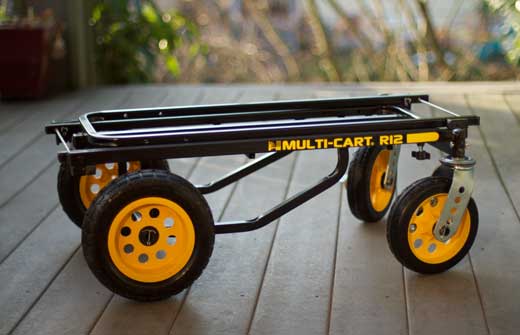
But today I was at Glazers here in Seattle, picking up a part for an upcoming shoot. I see this. “Tell me you sell this,” I said to the sales guy. “Why, yes, in fact, we’ve got a bunch of them in the back. This way.” He led me to back of shop, where a stack of cardboard boxes of varying sizes piled with carts. I didn’t even ask how much until the cashier told me $250. Deal.

So here you have it: the perfect cart. It’s called Multi-Cart, and I got the big one, the R12. They make some smaller ones which look pretty sexy too. But this one? Mine.

As you can see from the wheel detail shot below, there is a small amount of semi-permanent assembly required: you have to bend cotter pins around the axel to attach the wheels, which means you can’t get the cart to lie flatter than 12″ deep. Too bad there isn’t a way to quick-release the wheels, because then the cart would pack down even smaller for transport. It’s also not exactly light weight at just over 30 pounds. But I really like the quick adjustment, and folding uprights. And it’s smoooooooth rolling.

More Final Cut Pro X editing tricks

Been doing nothing but edit the past few weeks and I’ve picked up a few tricks I’d like to share.

Matching Framing: If you’ve got your skimmer over a clip in the timeline and want to see the original clip in the browser, you can call it up by pressing Shift-f. This one is useful if want to see quickly whether there was more to the clip (saves you having to drag out the handles in the timeline to see whether anything is there). Or if you simply want to find the same clip because you know there’s something after the edit point that you want to use.

Sample-accurate sound editing: FCPX doesn’t allow you to split clips (audio or video) in increments smaller than a frame. This is fine for video, but sucks for fine audio editing, which contains many samples per frame. But there’s an easy workaround. Instead of cutting the clip, you can keyframe the audio level to -96db to remove it. Insert four keyframes in the audio level, then drag down on the middle to reduce the audio level and remove the offending audio.

Better Sound editing: Turn off video display in timeline and increase the size of the waveform. Makes your job way easier. You can do this quickly by pressing the light switch in the lower right of the timeline, and calling up the options available to you there.

Quick audio levels change: With video or audio clip selected, press Ctrl and the minus or plus key. This will drop or raise audio level by 1db.

Replace with gap: I find I often want to delete a section of video or audio, but leave a gap rather than have it close up. So instead of pressing “delete” use Shift-delete. That deletes and replaces selected range with a gap clip.

Lift edit: When editing dialog and b-roll, you sometimes find you want to put a clip that was in the main timeline onto a connected timeline, and replace it with a gap to preserve the length of the edit. Select the clip in the primary timeline, and press Opt-Cmd up arrow.

Select clip: When skimming over a clip in the timeline, pressing C will select the clip.