Category Archives: Tips

One ring to rule them all: seamless focus gears by mechanical engineer Sean McCurry

First you get a DSLR, then you get a follow focus unit. Then a bunch of stuff happens, and you end up with a pile of this on your living room floor:

Today I’m happy to report that such bandaids for dslr lenses are no longer necessary, thanks to a mechanical engineer named Sean McCurry, who is quietly revolutionizing the follow focus gear, one perfectly printed lens gear at a time. Wait, printed? But before we get into that…

I guess you could say that I’m a focus gear whore. I feel like I’ve tried just about everything on the market in hopes of finding one that worked seamlessly (so to speak) with my set of Zeiss/Contax primes. But every one I’ve tried has left me cold. To be specific:

Redrock Micro gears are nice because they give some autofocus lenses some much-needed extra throw. But with my Zeiss primes, I found the extra throw to be too much. And the ergonomics suck: too big to store in my lens case, they have to be assembled before every shoot. Major bummer. I want gears that I can buy and forget about,.

Zacuto Gears are basically thin bands of plastic that have a big awkward bump. They get the job done, but I’ve had them slip off my lenses more than once while running and gunning, because the bit that holds the two ends together gets caught on things. Oh, and they aren’t cheap.

If you want cheap, you want Jag35 zip-tie gears. But like the Zacuto, they catch on things, and they don’t add any throw diameter to your lens, either.

Genus gears are one-size-fits all, which makes them great for larger diameter lenses like my 300mm f/4 Nikon. It’s the only gear I could find to fit it. But not at all great for more standard size lenses, where the tightening screw gets right in the middle of your business. Plus, they tend to loosen up during use, and you have to remember to keep retightening them.

One thing I have never tried: Duclos cine-mod. This is the gold standard of lens gears. And by gold, I mean $105 a pop. But what’s prevented me from going Duclos is that you have to send your lens away for an unknown length of time to have the mod done. That more than anything has been the deal-breaker for me. I need my lenses.
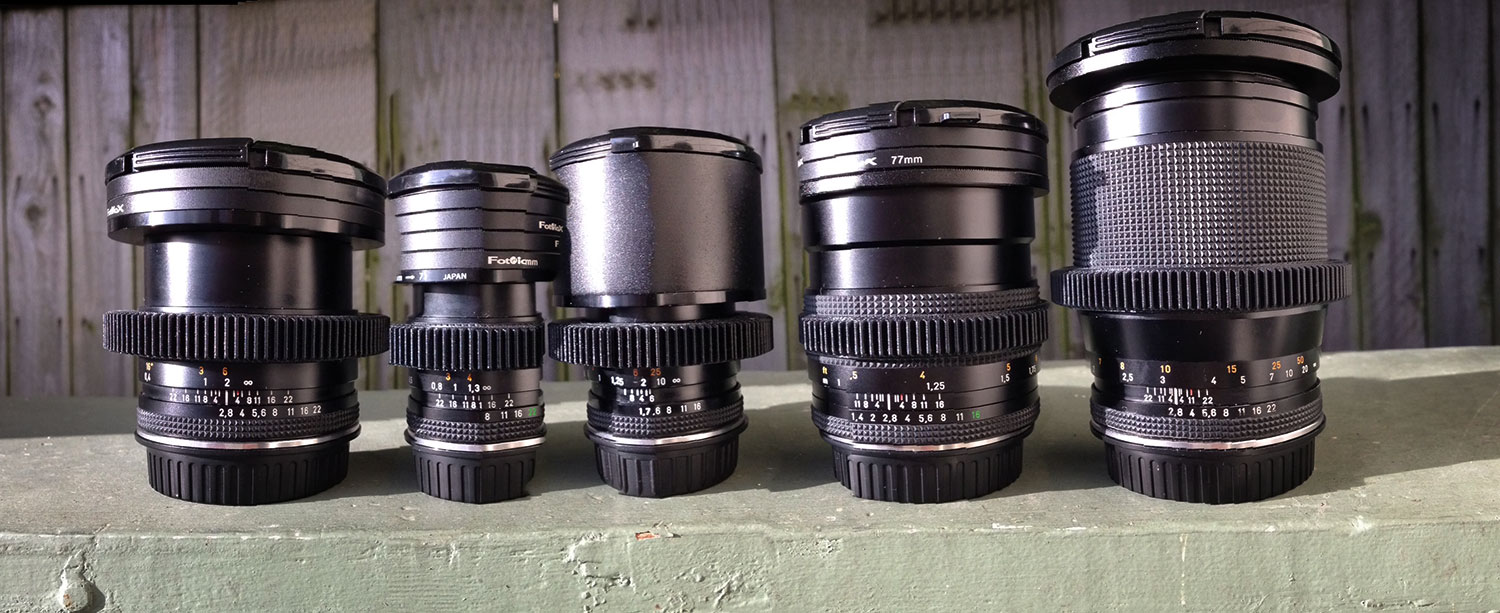
Above: iPhone pano of my set of Zeiss primes, with Sean’s gears.

So. Is it too much to ask to have something as perfect as the Duclos mod, for a third of the price, that without any tools, I can install myself?

Enter a mechanical engineer named Sean McCurry. I accidentally discovered his brilliant work while surfing on Ebay a few weeks ago, when I was startled to see a listing for “Seamless follow focus gears” specifically made for Contax-Zeiss primes. I have a lens set that ranges in size from 25mm – 135mm, and Sean had each of my focal lengths covered. For $35, I took a chance and ordered one for my 50 f/1.7 prime. It arrived three or four days later, and with great curiosity I took it out of the box. Four pages of instructions on lens fitting were included, but were unnecessary: the gear fit PERFECTLY. I simply had to very carefully and slowly wiggle the gear on, until it seated firmly into the spot where I wanted it to stay on the focus barrel of the lens. The fit is so tight that it doesn’t slip at all, doesn’t require glue, and feels like it was made for my lens. Which, in fact, it was.

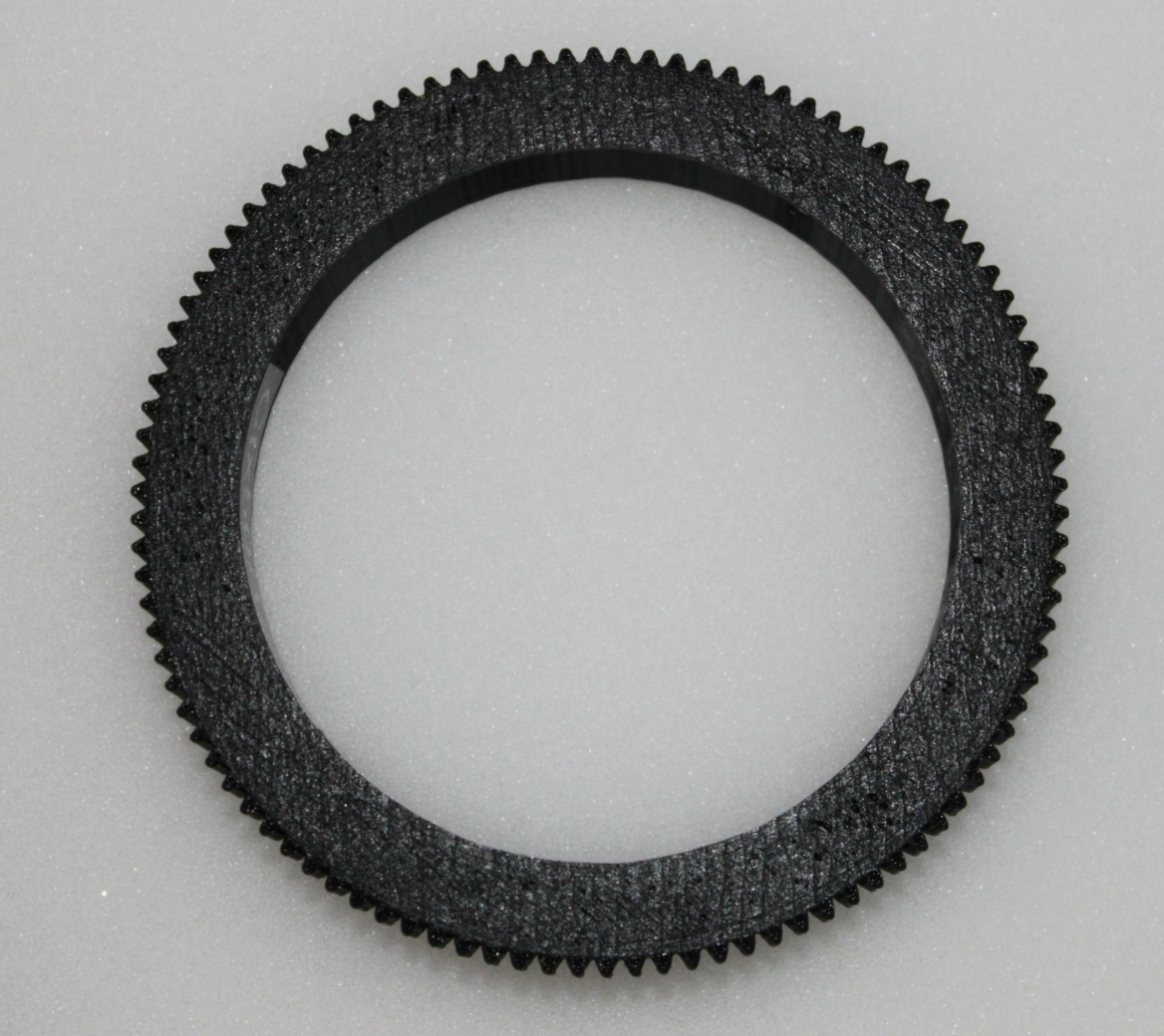
I’m not 100 percent sure how Sean is able to make such killer gears. But I’m confident it’s because he’s 3D printing them. A close examination of the gears reveals telltale patterns, strata in the plastic that are consistent with 3d printing (click image to enlarge):
One great thing about these gears is that I was able to place them at approximately the same position on 4 of my 5 lenses, so that when swapping lenses, I don’t have to adjust the focus puller position on the rails. Also, my previous gears would ride up and down the lens as they came in and out of their foam Pelican case, requiring constant readjustment, often in the middle of a shoot. These gears stay put.

Need more amazing? Beyond the great ergonomics, these gears producer smoother more predictable and repeatable pulls than I’m used to getting from my previous gears. Maybe it’s the extra gear depth, maybe it’s the precision of the printing, maybe it’s the Delrin they are made from. Whatever it is, these gears have taken my focus pulling to the next level.

Sean is currently making the gears for popular DSLR lenses that include the following:

Sigma 18-35mm f/1.8

Set for Contax Zeiss Lenses

Canon 100mm Macro lens

Nikon 105mm f1.8 AI-S Lens

Canon 24-70mm Lens L Series F2.8

Canon 70-200mm f2.8 L IS Lens

Tokina 11-16mm f2.8 IF DX II Lens

You can see the full list (currently 105 items) to see if your lenses are on it.

Don’t see your lens on the list? Sean welcomes custom orders. You can measure the circumference of your lens, and email your request to helicoptersean@gmail.com. Or contact him via his Ebay shop.

So here we are. Living in a world where the best stuff can come out of a printer. Welcome to the future.
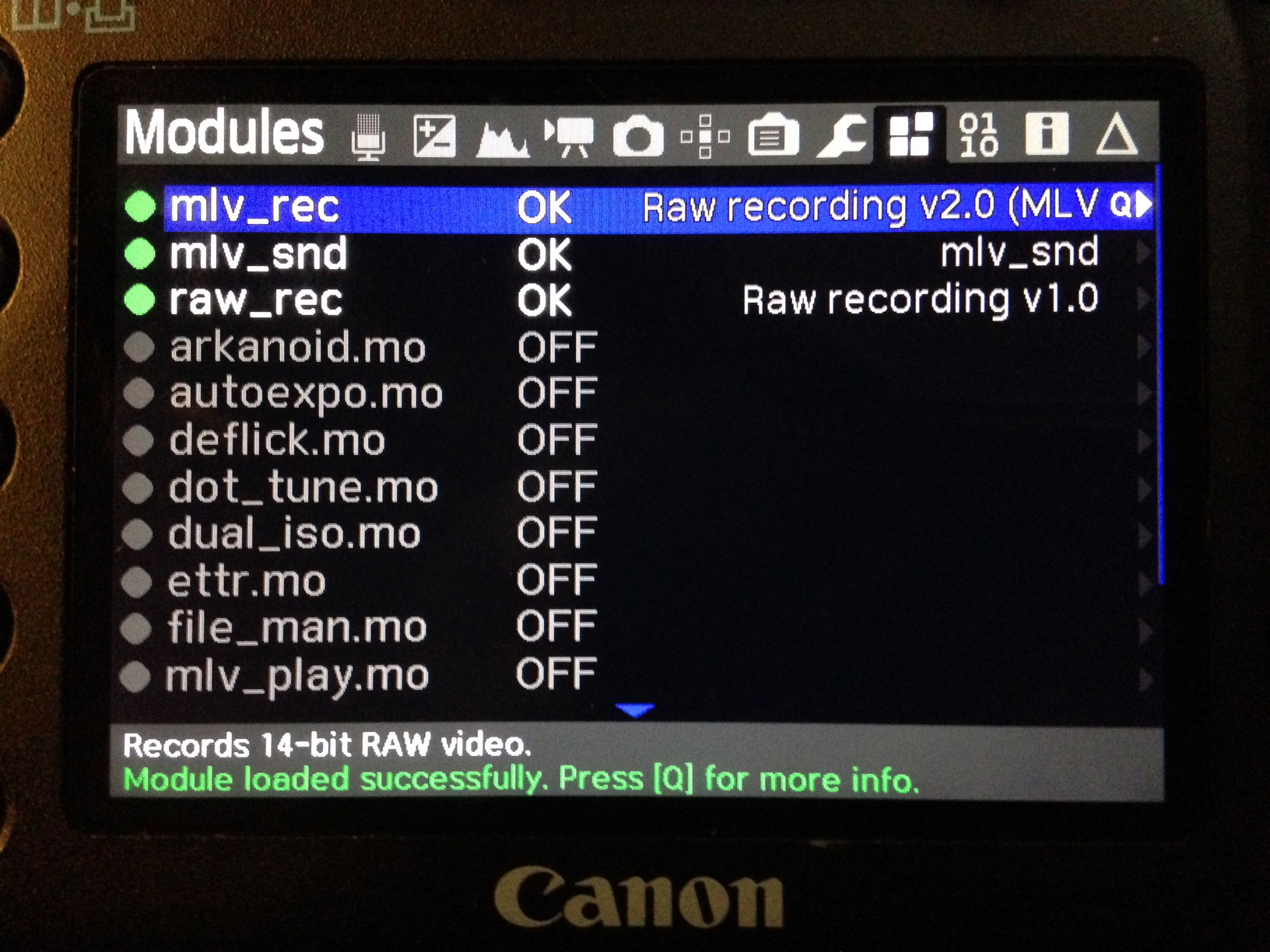
Magic Lantern raw now supports audio recording with MLV format

Magic Lantern raw keeps getting better. It’s been awhile since I downloaded and tested the latest nightly builds. Turns out there’s a LOT of progress being made: the latest releases include the option for a new recording file format called MLV (for magic lantern video). This format allows for some really great stuff, most significantly for me, audio recording.

Post-production keeps getting better, too. There’s a new batch-conversion utility called MLV Mystic that allows Mac users to unpack the MLV files directly into cinema DNG files, which can then be opened directly into Davinci Resolve 10.

HDMI monitoring is also vastly improved. Gone is the bug that caused pink-frame tearing when recording 3x (which at the press of a button turns any lens into a macro). No more pink frame tearing! Also, the monitor display bugs that incorrectly drew the boundaries of the frame are fixed.

HDMI tip: I discovered this weekend while testing that it’s critical to plug in your hdmi monitor to your camera in the correct order. First, with your camera off, power on your HDMI monitor and plug it into the camera. Then, power up the camera. This way, it will correctly draw the HDMI screen. Otherwise, you get some misaligned black bands encroaching into the display from top and bottom.

Another sweet thing, and this is a big one: I discovered after much testing that Magic Lantern’s focus peaking is just killer. It works like magic to help you find focus, and you can select from three settings: one for darkly lit subjects, one for brightly lit subjects, and one that is a bit of both, for average scenes. This peaking is the first I’ve ever used that actually works without over sharpening to death or otherwise unacceptably screwing with my monitor. I’ll be using it by default from now on.

All I can say is: thank you Magic Lantern team. You guys are tireless in continuing to unlock the potential of this amazing image making tool called the Canon DSLR. The raw video image coming out of this camera is breathtaking.

Shooting in a rain forest is a bit like shooting under water

I just returned from spending the longest night of the year in one of the darkest, dampest places in Washington: the Quinault Rain Forest. Lisa and I spent a couple of days there last year, and discovered it to be a magical wonderland for photography.

When we returned this time, we brought a Speedlight and a 20″ Glow Hexapop, made by Adorama. This is a small and very portable soft box, so it was a small thing to pack it along. But we were really impressed with the results when we used it to backlight our subjects. Just as with underwater photography, subjects that otherwise look monochromatic in the eerie half light come to life with a little pop of strobe. Happy Solstice!

The invisible key to better documentary film interviews

I know the key to better documentary interviews. A silver-bullet technique that has enabled me to make award-winning films like The Coffinmaker and The Metalsmith (both Vimeo staff picks). In the photo above, Scott Berkun is using the technique to interview Martina Welke of Zealyst for We Make Seattle. It’s not difficult. In fact, it involves doing less than what you’re currently doing.

Huh, you ask? How can doing less make my films better? I’m going to share this technique with you in a minute. But first, some background.

When I began making documentary films five years ago, I was coming from the world of still photography. In that world, it’s possible to be a one-man band and do a great job. Not easy, mind you, but totally plausible. Film is a different animal.

Consider for a moment how many balls you must to keep in the air to pull off the simplest of shoots, the interview:

  1. Camera (focus, batteries, monitoring subject movement within frame).
  2. Lighting (changing ambient light, placement of lights).
  3. Sound (levels, distance to subject, mic axis).
  4. Location (noise level, permissions).
  5. Subject (makeup, direction,)
  6. Interview (preparation, full attention, questions, redirect).

And that’s just the production bit. If that all goes well, you get a bunch of footage and audio that you must store on a hard drive, then go to work on. That involves importing into your editing suite, watching it, listening to it, cutting the interview, carefully placing b-roll on top of that to hide your cut points, adding music, color correcting, audio mixing… Whew, it’s a lot to manage.

But let’s stay focused on the production piece. Now, consider that these variables don’t just have to be aligned for a split second, as with a photograph – with film everything has to STAY perfect for the duration of the shoot. If the sun comes out halfway through, you have to change exposure. If the subject gets excited and leans forward, you need to adjust focus. And, all the while you need to maintain human contact with the subject, so they feel you are present in the conversation with them.

It’s too much for one person to manage. Really, it is. Two people can swing it. But one? Forget about it.

Since I couldn’t do it all, I considered what I could NOT do, and still get the job done. Can you guess what that was? For a guy most comfortable with a camera, it was a tough one to swallow. I skipped the eyes and went for the ears.

If you had to watch 30 minutes of someone talking without sound, how long would you watch? Now, if you had to listen to 30 minutes of audio without video, how does that change things? A lot. But wait, you say, we’re making a film, not a radio program! Yes, but if you’re making a film, doesn’t that mean you want to show action? And does a person sitting in a chair really qualify as action?

The key to getting better documentary film interviews is: don’t bring a camera. You heard me right. Leave the camera at home. That way, you won’t be tempted to use it. Instead, you’ll free yourself to think about the story. You’ll connect better with the subject without your eyes constantly wandering away from theirs to check focus.

But what if you have plenty of crew? You should probably still skip it! Here’s why: because most people are intimidated by cameras. They are distracted by thinking about how they look, their makeup, wardrobe, etc. Consider this: How often do you FaceTime someone when you want to call them? I think I’ve used it twice in the three years I’ve had an iPhone. It’s invasive. I’m more comfortable talking as opposed to acting. Same is true in your average documentary interview situation. Take away the camera, and you take away the self-consciousness. Take away the self-consciousness, and you get straight to the good stuff. The scary, emotional stuff.

There’s another benefit to doing interviews without camera: it forces you to shoot better b-roll. In fact, it forces you to think differently about b-roll altogether. No longer is it filler to get you through – it becomes everything! So you have to think of action that can carry the story. And your film just got better.

There’s another benefit: you won’t be able to make the mistake of including too much talking head time, because you don’t have any!

It’s a big commitment. But try it once. You may be surprised with the results.

3 Video Lighting Disasters a Light Meter can Prevent

With digital video cameras, it’s tempting to shoot everything off the monitor. What you see is what you get, right? Well, sort of. I’m thrilled with the exposure tools we have today – in particular the waveform monitor and histogram that Magic Lantern has unlocked on my 5dmkiii. But there are some situations where depending soley on what you see can get you in trouble.

1. It looked good on your monitor when you shot it…but it’s too contrasty (or not contrasty enough) in post. No one knew how the film was going to be graded at the time it was shot, so somebody said “let’s just shoot it flat” (ie, using something like the ProLost picture style). Good idea. But shooting it flat isn’t the same as lighting it flat. For best results, you need to know what contrast ratio to use. And that’s where your light meter comes in.

How to find contrast ratio. Let’s assume a simple interview, with two lights: a key, and a fill. To determine the contrast ratio, turn off the fill light. Point the lumisphere at the key, take a reading and note it. Next turn off the key light, and repeat to read the fill light. You now have two f-stop values, i.e, f/8 for key, and f/5.6 for fill. To determine contrast ratio:

1:1 ratio = lights are the same, perfectly even
2:1 ratio = 1 stop difference between lights
3:1 ratio = 1.5 stop difference
4:1 ratio = 2 stop difference
8:1 ratio = 3 stops (one half of face is very dark)

On my Sekonic L-358, there is a handy feature for performing this calculation automatically, called “brightness difference” mode. I recommend investing in a light meter that can do this for you, otherwise you have to do some awkward math. And you’re don’t call yourself a filmmaker because you wanted to be an engineer, do you?

So, to avoid this lighting disaster, do some camera tests as described above in advance of your shoot, using several different contrast ratios. Then apply your intended grade to the footage, and see which contrast ratio best gives you the look you’re going for.

Tip: I most often grade with FilmConvert Pro, which is a quick and powerful way to get great-looking footage (esp. skin tones) out of DSLR video. With FilmConvert, I find that I have to shoot at a lower contrast ratio than looks normal on my monitor for best results with many (but not all) of the film stocks.

Side note: Be sure to get a light meter that supports cine frame rates. Many inexpensive light meters don’t allow selecting shutter speeds between 30th/sec and 60th/sec. For 24p video, you need 48th/sec. But it’s pretty easy to find a quality meter used. I was able to find a Sekonic L-358 for $160 on Craigslist, and it does everything I need and then some.

2. It looked good when you shot it…but you can’t repeat it. The director wants you to reshoot a scene – but you can’t remember how you lit it. Or you simply need to match the lighting from day to day on a multi-day project. You’ve got lighting continuity problems.

Solution: The first time you light it, take a light meter reading for each light on set. Record three values: ISO, aperture number, and frame rate. I.e, 640, 5.6.3, 24. That way, when the director calls you a month later begging for a reshoot, you’ll be able to say “no problem.” Lighting, at least, won’t be the cause of any continuity problems.

3. You scouted the location, but when you arrive on the day, your lights aren’t powerful enough to match the window light. Ooops. Had you carried a light meter while scouting, you’d have known what to bring.

When scouting a location, a light meter takes the guesswork out of the process. It also helps you communicate with the rest of the crew, which is invaluable for larger projects where someone other than yourself may be setting up the lights.

And finally, I’ve found that carrying a light meter is a great way to educate the eye. How bright is that overcast day in Seattle? (Almost f/11 at ISO 160 for 24p. Brighter than you might think!) How bright is that fluorescent office environment? Hmmm, f/4 at ISO 640? Hold up the meter, click, and discover that it’s f/2.8 and a half. Having this kind of instant feedback is key to rapid learning. After awhile, a light meter will make you pretty good at this game. And that can’t help but make you a better filmmaker.

Do you use a light meter on your projects? How do you use it?

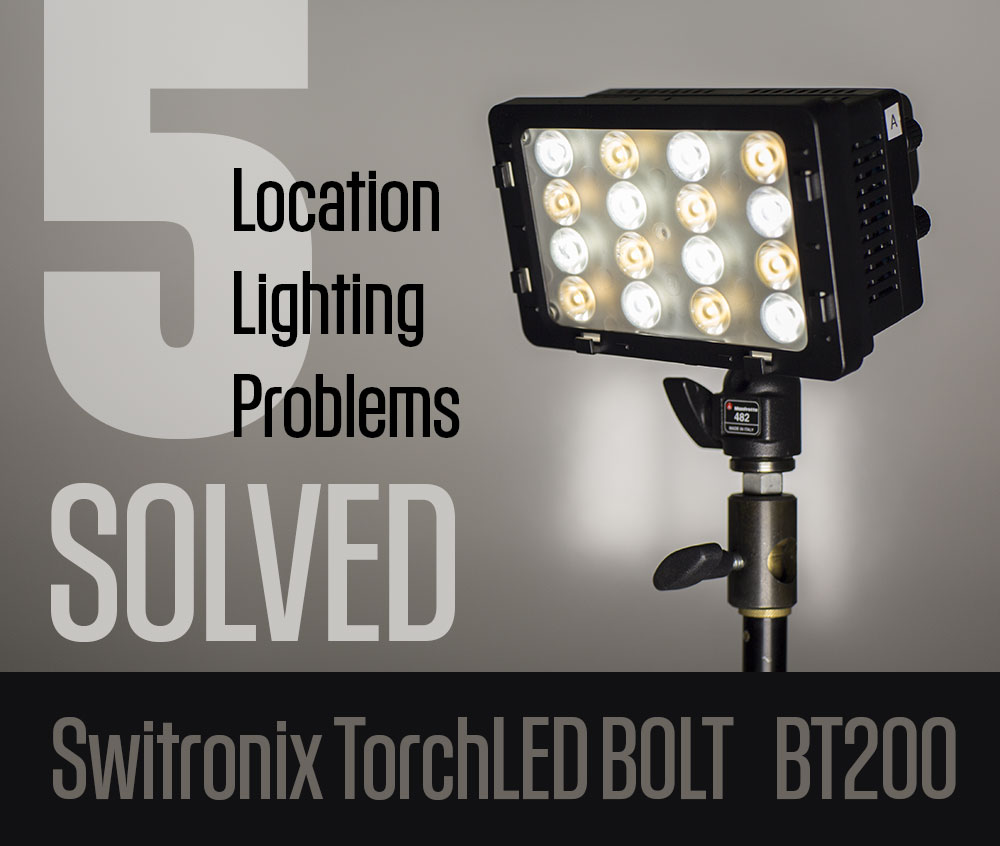
5 location lighting problems solved with Switronix TorchLED Bolt

Last summer I DP’d a short film written by Persephone Vandegrift. I’m in the basement preparing to shoot the scene we’ve been saving to the very end, in which Telisa Steen’s character destroys a dollhouse in a fit of grieving for her lost daughter. I’m a little nervous for three reasons. One, there would be no retakes, because the prop would be destroyed. Two, the home owners want us gone in an hour. And three, the ceiling in this bedroom is so low that I can reach up and touch it. So hiding a light is going to be a bitch. And I need something, fast, to separate Telisa from the background. What am I gonna do?

I reached for my “Peacemaker,” the sun gun that’s always within reach: a Switronix TorchLED Bolt. I’ll explain what I did with it in a moment. But first, I’d like to state that this post covers the TorchLED 200. I just learned that Switronix has announced an updated version, the TorchLED Bolt 220, that is 10 percent brighter, $120 more expensive (although B&H has steeply discounted it to $279 through dec. 4), and claims to fix a color mixing issue I discuss below.

The Switronix Bolt LED is hands down the most versatile video light I’ve ever used. In the 9 months since I got my hands on one, I’ve used it like a monkey wrench to fix all kinds of lighting problems. Here’s why:

  • It’s powerful for its size.
  • It’s tiny. So it’s easy take with you.
  • It’s controllable. It throws a tightly focused beam a long way without interfering with other lights.
  • It’s color adjustable. Two knobs allow you to select between 3200k tungsten and 5600k daylight.
  • It’s strong battery powered. L-mount Sony batteries keep you going for more than two hours at full blast, or more than twice that when dialed down a bit. Connect them to a Switronix V-lock battery using the included adapter cable, and you can run all day.
  • It’s inexpensive. About $250 including battery and cables.
Distance TorchLED LitePanels MicroPro
3 ft. f/11 f/2.8
6 ft. f/5.6 f/1.4
12 ft. f/2.8

Just how powerful is it? Take a look at the numbers to the right. I broke out my light meter and compared it to a venerable LitePanels Micro Pro, and got these light meter readings at 50th/shutter at ISO 640.

I recently bought a second one and they go everywhere with me in my camera case. Maybe that’s why they get used so much – they are always handy when I need them. And because they are battery powered, with batteries that last for hours, I don’t have to think about running extension cords when I want to deploy a light. Sometimes that’s the difference between adding a light and getting by without it.

OK, so let’s go back to that low-ceilinged room and see what we can do with it.

Problem 1: Low ceiling – no room for placing backlight without getting it into the shot.

Solution: Hang a Bolt from an autopole.

With the clock ticking, my camera assistant David Fareti was able to attach a Bolt to an autopole with a Matthelini clamp. The only other light with us that might have worked was a Lowell ProLight, but it would be so close to the ceiling that it might have caught the place on fire. And there’s the time it would have taken to hide the power cable. So it simply wasn’t an option. In the end, our shot come up looking like this frame from the film:

Problem 2: Talent shows up for interview wearing wide-brim hat. No time to re-light.

Solution: Place Bolt on stand close to camera lens, at eye level with talent, and dial it to provide -2 stops fill.

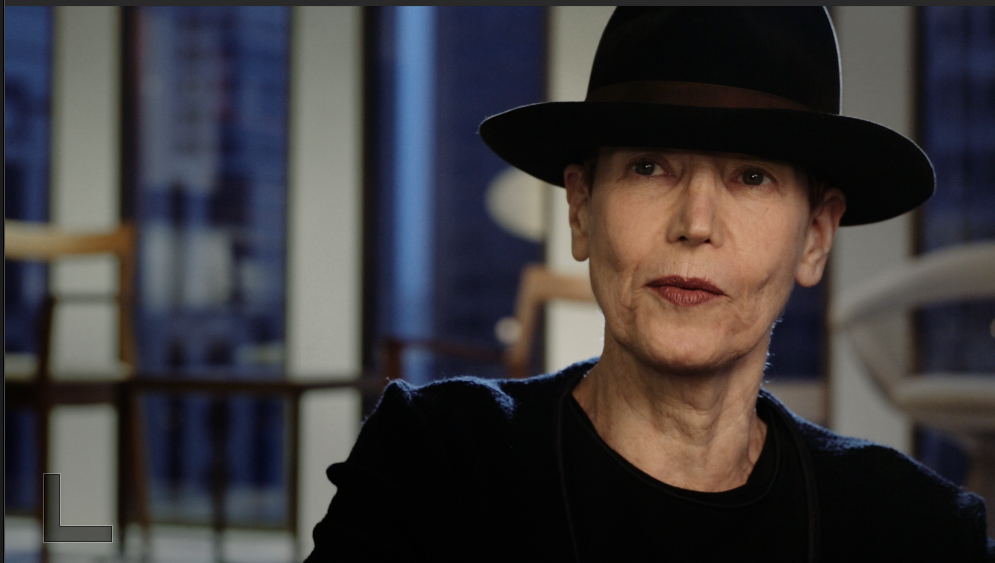
We’re filming a series of interviews with legendary graphic designers for the Seattle Design Lecture Series. Our first interview was with April Greiman, who arrived an hour late for the interview wearing this huge hat. We had to roll almost immediately because she was due to deliver her speech in about an hour. Gulp. I knew her eyes would go black under that hat, but I didn’t just want to lower the key and blast light up in there – the only thing worse than under lighting is over lighting. I have learned to keep a spare Switronix pre-mounted on a light stand for just kind of situation. I simply placed it just to my camera left at lens height, and dialed in about -2 stops of light. Like so:

Instantly, her eyes come to life with the catch light in them, and her expression emerges from beneath the brim. Yet, a sense of mystery is preserved. Despite the fact that the Bolt is a small hard light, you can get away with using it undiffused as fill. Oh, and that’s my other Swit sketching her hat and shoulders with rim light.

Problem 3: Strong sunlight on subject needs a quick fill.

Solution: Put Bolt on camera and crank it all the way up.

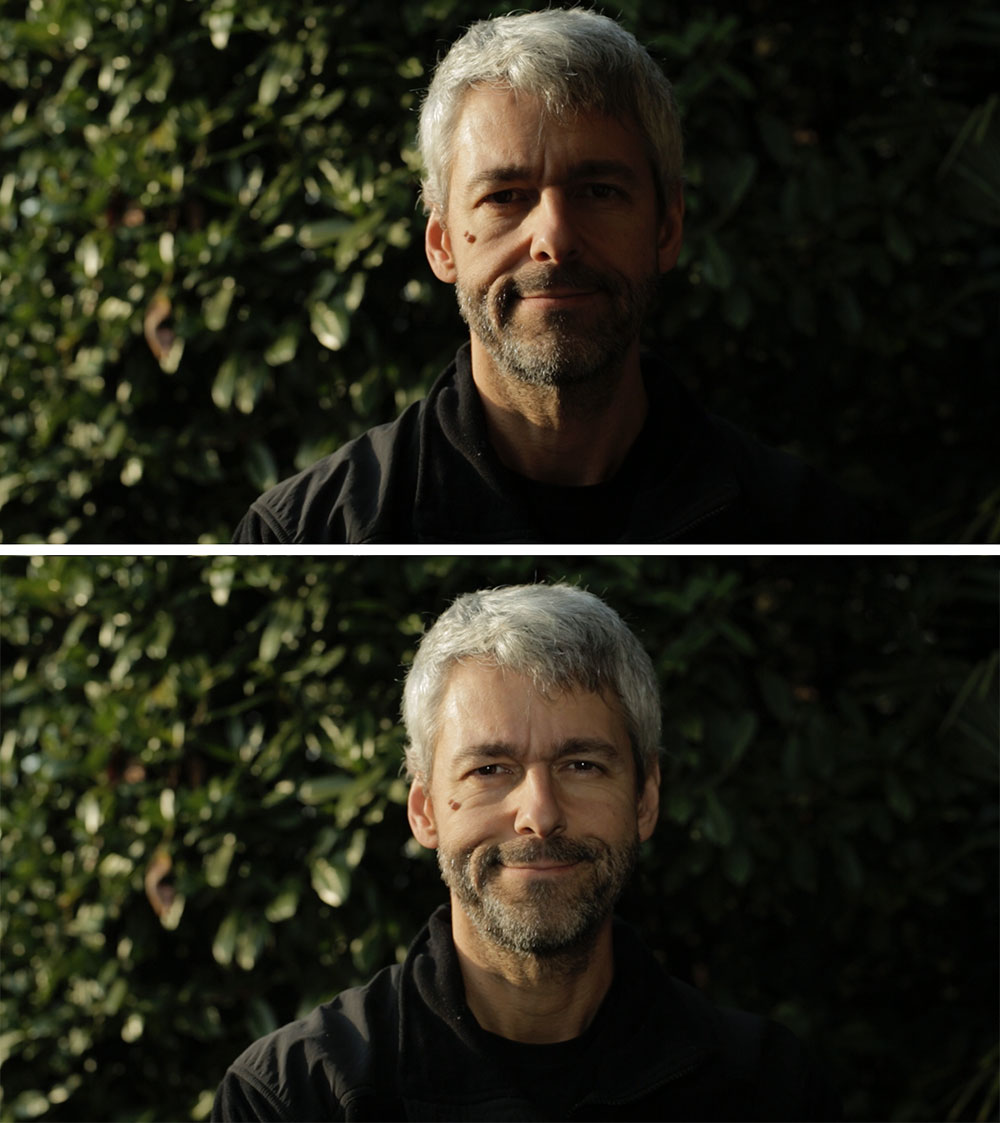
OK, so I wouldn’t normally light an interview like this. I’m showing you this to prove a point: for ENG-style interviews, the Bolt IS bright enough to fill direct sunlight…if you keep the subject within about 3.5 feet of the camera. For this selfie shot on my 5dmkiii, the Bolt was set to full power at 5600k, the aperture was at f/4.5 with a .9 ND filter (-3 stops) on 50mm lens, at ISO 160. Take that, sunshine!

Problem 4: Need a hair light but must avoid window reflections.

Solution: Clamp Swit Bolt to ceiling-mounted light track.

I recently had the pleasure of interviewing New York graphic designer Stefan Sagmeister for the Design Lecture Series put together by Civilization. I used quite a few tungsten lights gelled at 1/2 ctb, to get good color contrast with the blue window light that surrounded him. I couldn’t do what I normally do – place a light on a Manfrotto 420B boom arm for a backlight, because it would have been visible reflected in the glass windows behind him.

Luckily, there was some track lighting in the ceiling behind him, which wasn’t very sturdy. But it was strong enough for me to clamp a Bolt to it with a gaffer’s clamp. Lighting accomplished.

Problem 5: Need a quick kicker to add a little zest to otherwise good looking frame.

Solution: Swit on stand behind and beside talent.

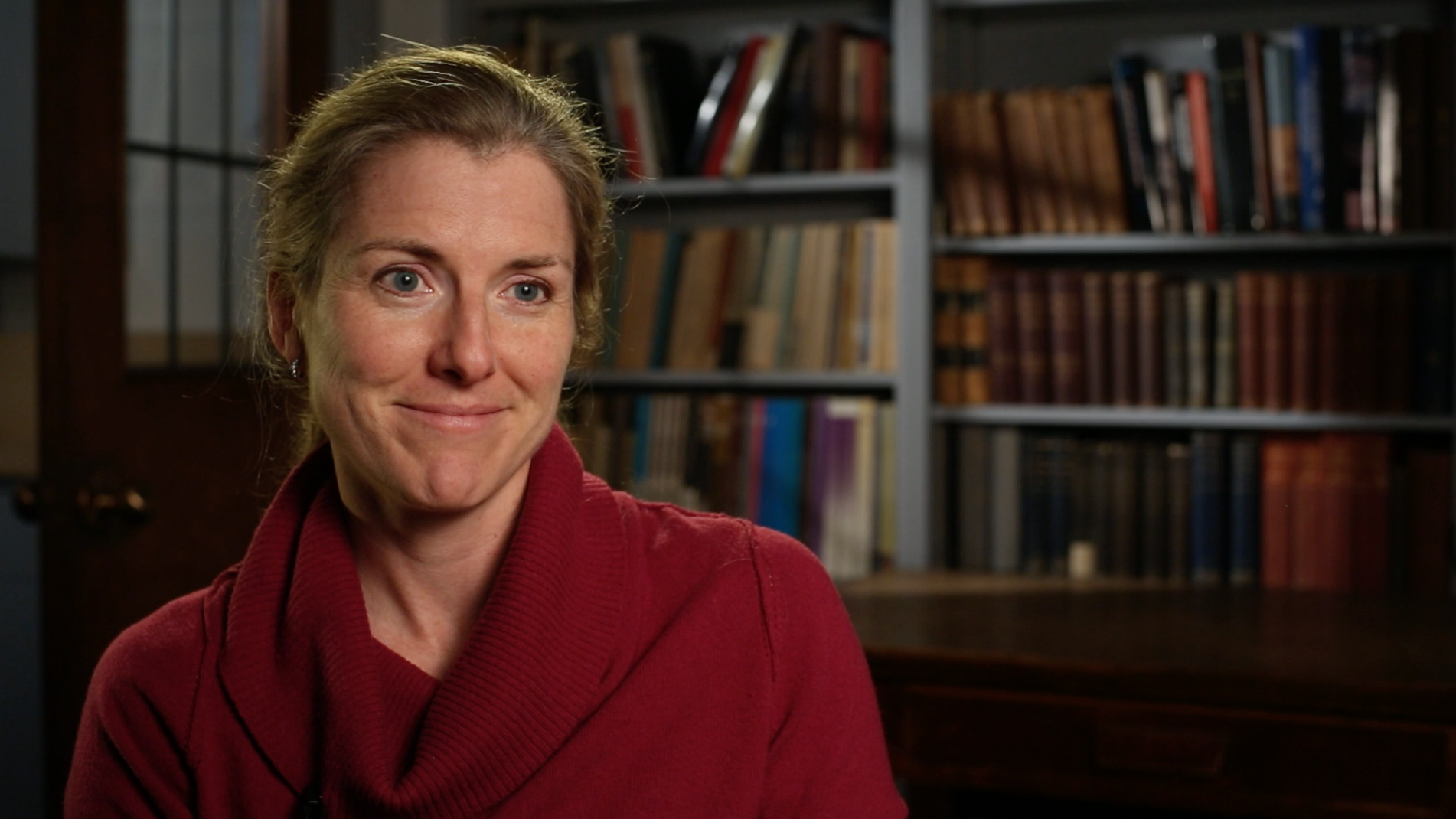
Here’s a shot that already looked pretty good with key light from a softbox, and background light pouring through a doorway window illuminating the books. But this UW professor wasn’t separating enough from her background. The solution was, you guessed it, two Bolt LEDs. The first I hung on a Manfrotto 420B arm which gave her a nice hair light, also illuminating her camera-right shoulder. Then I put a second Bolt on a light stand behind and beside her to camera left. This provided a kicker that also filled in the shadow side of her face a bit, and penciled out her shoulder. Roll camera.

A Phottix FTX2 Flash Bar allows placing two of these lights on a stand (this flash bar, which articulates at base, also allows mounting these lights inside an Apollo soft box). Conveniently, there’s a couple of slots for attaching a shoot-though umbrella. Pairing two lights through an umbrella, at 50th shutter and ISO 640, I get f/5.6 at 3 feet, f/2.8 at 6 feet, and f/1.4 at 12 feet. In practice, though, I rarely use them doubled up – that’s what my other lights (Arri 650, etc) are for, and these little problem solvers are better suited for use as kickers, rim and fill.

The Swit ships with a flimsy shoe-mount adapter, but for use on a light stand, you’ll need a stand adapter that has a ball head, like one of these. The one on the right is a flash swivel tilt bracket that you can pick up for about $12. And the other is a beefier 3/8″ stand adapter paired with a Manfrotto ball micro head that will run you $12 and $99 respectively.

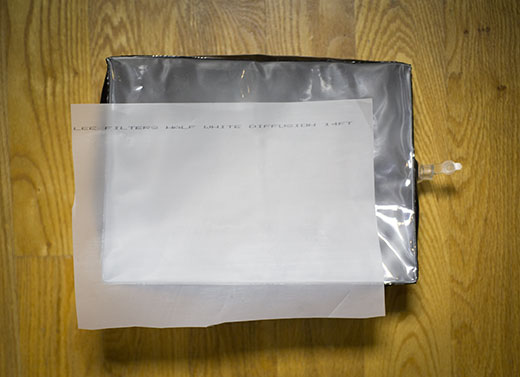
One more small accessory that’s worth having with this light: to soften the light, check out the Airbox.

In practice I tend to use the Swit without diffusion, because I appreciate the beam that it throws. Putting any kind of softener on this light really cuts its output. But, there are times when I just want some soft fill up close, and this has come in handy.

I have found that I need to tuck a sheet of 1/2 white diffusion gel into the sleeve on the front of the box, to get good diffusion. The clear vinyl alone doesn’t quite do it.

So, is everything amazing about this light? Almost. But there are a few things that I’m hoping will be improved with the next version of this light.

Drawbacks:

The batteries don’t exactly lock into place. You have to be very carefully placing these lights, or the batteries can fall out. I wish it had a positive locking mechanism.
Color mixing isn’t exact. The twin color-temperature dials on the back aren’t spot on with regard to color temp. I’ve noticed that I need to dial up about 1/3rd tungsten to 100 percent 5600 to get good daylight results – otherwise it’s too blue. The 5600k dial should be labeled the 6000k dial.
The diffuser card falls out. As with the batteries, there’s no way to lock the diffuser into place. Both of mine went missing very quickly. The same person at Swit seems to have designed this as and the battery plate. Seems like a small design change could fix both. My email to Switronix asking how to purchase a replacement has gone unanswered.

Bottom line:

Owning this light won’t make you a better filmmaker. Or will it? It’s made me a better one, because now it’s so easy to do the right thing – add that rim light, dial in that fill, tweak that color temp – that I’m actually doing it, instead of thinking about it. Having a Bolt in your bag arms you with a powerful light that delivers on the promise that LED lighting has been whispering for years: cool light when you need it, where you need it, no cords attached.

10 most common audio mistakes in documentary filmmaking

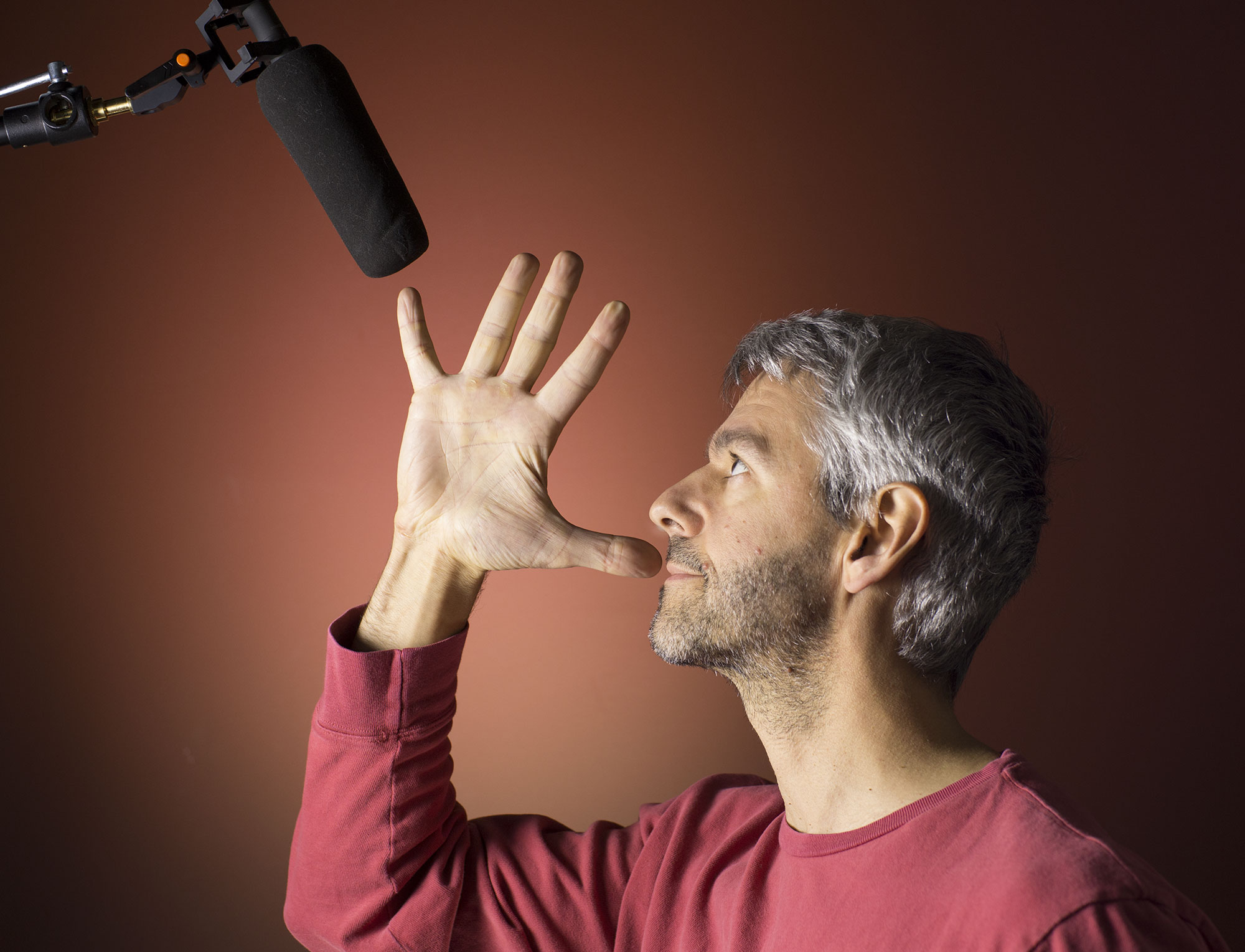
1. Not getting mic close enough. If you audio isn’t good enough, it’s probably because the mic isn’t close enough. Are you trying to get by with an on-camera mic? Get the mic off the camera. Really. At a minimum that will mean using a radio lavaliere. And preferably a shotgun mic operated on a boom pole. Use the hand trick to find the ideal mic position, as follows:

Place your thumb in front of your mouth. Fully spread your fingers at a 45 degree angle. The tip of your little finger is where the boom mic should ideally be, about 6-8 inches away. Of course, it varies with the subject, and with the shot. Sometimes you just can’t get that close without risking getting the mic in the shot. You can get away with 1′ away, maybe even 16″ away. But if you’re regularly 2-3 feet away, background noise is going to color your audio big time. And you can’t remove that in post.

2. Hiding lav on subject produces distracting clothing rustle. I’ve worked with professional sound recordists who tell me hiding lavs is the most challenging part of their job. And it’s true: once you put a lav under clothing, you’re going to have issues. It takes a lot of trial and testing to get it dialed correctly. Sometimes, it’s just impossible. I generally use lav audio as backup, preferring the cleaner sound that comes from a boom mic. But for those times when you’re counting on a hidden lav to pay your bills, here’s how to hide a lavaliere mic.

3. Handling noise caused by changing hand position on boom or mic. OK, you’ve committed to using a boom pole. Your sound is so much better already! But watch out – a low rumble will be introduced to your recordings every time you reposition your hands on the pole. So once you roll sound, settle quickly into a position you can hold for the entire take. It doesn’t have to be like lifting weights. Follow these boom mic recording tips and your audience will thank you.

4. Distracting noise in background. The most common offenders here are refrigerators and HVAC systems. Remember that shotgun mics are directional – so point the mic away from the direction of the noise. Better yet, eliminate it entirely by turning the heat down or tripping the fridge circuit breaker (put your keys in the fridge so that you don’t accidentally leave without restoring power). That’s why getting the mic overhead on a boom pole works so well – because sound rarely comes from below. But even shifting the mic 45 degrees can make a huge difference. Listen carefully before the take begins to find the best mic angle. The more background noise, the closer the mic will need to be.

5. Room is echoey (too “bright”). Small rooms are usually worse than large rooms, and any uncarpeted room with bare walls spells trouble. Basically, you want a room that is “homey”: carpeted, drapes on the windows, plush furniture, bookshelves lining the walls–anything that will break up sound waves. If you have a slight echo, however, it is now possible for you to fix it in post. Check out the Unveil plugin by Zynaptiq. It does magic to dampen slight reverb.

6. Forgetting to record room tone. When your take is finished, the last step is to record what silence sounds like in that particular environment. If you forget, as I still sometimes do, it makes it difficult to edit the dialog. So make it a ritual, like the chant I breath to myself every time I leave the house: keys, phone, wallet. Every time you say “that’s a wrap,” first say “30 seconds of room tone, please.”

7. Audio levels become clipped because of sudden loud noise. You’re recording some dialog and your subject starts laughing. Or cheering. Or shouting. If you have a good mixer, the limiter can automatically catch brief outbursts like this. But if you’re using inexpensive recorders and can’t turn the recording level down fast enough, you’ll get clipped audio. But once the damage is done, is there any way to fix this in post? Yes, believe it or not, there is. Some of the cheering crowd scenes in my documentary Beyond Naked would have been unusable if not for iZotope RX, an incredible suite of repair tools. The iZotope Declipper can rescue even horribly distorted audio.

8. Forgetting to charge/replace the batteries. Yep, it still happens to me. On some inexpensive recorders such as the Zoom H4N, if the batteries die during a take, you will lose the entire recording. So as a way to prevent this from happening, as well as a way to stay more organized, I recommend rolling early and often. On a lengthy interview, for example, don’t just hit record and forget about it until it’s over. At strategic points such as between questions, stop and re-roll. Also, get into the habit of charging/changing the batteries immediately AFTER each shoot. That way, you’ll always be ready to go.

9. Radio interference from cell phones. Almost everyone is carrying a smart phone these days. They stay connected by sending radio bursts that can be audible by a sensitive mic. Before every recording session, pretend that you are the captain of a plane about to take off: ask everyone in the room to put their phones into airplane mode. Not only will this prevent radio interference, but it will prevent your take from being ruined the old fashioned way: when the ringer goes off.

10. Using cheap gear. The difference between a $200 mic and a $1,200 mic is pretty amazing. And since pretty much every video you make from here to eternity will have sound, it makes sense to invest in a quality mic and a recorder that has decent pre-amps. Thankfully, Moore’s Law doesn’t apply to sound gear the way it does to camera sensors. You could easily be using the same mic you buy today in 10 or 15 years. So don’t scrimp on sound.

Tame hot backgrounds with reflected light

Yesterday I shot some interviews in a modern office building that had tons of big beautiful window light. Having all that natural light makes for an excellent interview setup, but it comes with a few challenges, too. Here’s a tip I’ve learned to help you work with the light, rather than against it – using just the available light (and an optional small LED light).

I love the look of light emanating from behind a subject. It just adds so much life to a talking head. So I always try to place my subject with window light behind them. This works best when you are in a corner that has windows on two sides: the window light coming behind them makes the background come alive, and the window beside provides the key light. The challenge is that the background window is always going to blow out, because it’s much brighter than the light reflected on the subject (assuming we’re ruling out direct sunlight, which I generally avoid for interviews because it moves during the interview, making it impossible to cut without continuity problems).

The simplest solution to this challenge is simply to let the background blow out altogether. This can work very well in some cases. Yesterday, for example, I shot this executive in his corner office bathed in window light:

I think this approach can work extremely well. We don’t really need to see detail in that background, which might distract from the subject anyway. But what if you WANT to see detail in the background?

Applying ND to every inch of window is impractical (not to mention very expensive). You could pack a powerful light, probably at least a 1k, and use that to key the subject. But if you’re in a modern conference room that has glass walls on all sides, there is a simple way to solve this problem. Instead of positioning the subject with their back to the window, position them facing the window, so that you’re now shooting the light reflected in the glass wall behind them. This magically brings the light into near perfect balance, like so:

You have to have the subject pretty close to the window to get the light level high enough, though. This makes it awkward for you to fit yourself and your camera into the small space remaining. Putting the subject further back in the room means they are underexposed. What to do?

This is where a small, hard light like the amazing Torch Bolt LED from Switronix comes in for the win. In the frame grab below, I’m using the Bolt to just bring up and slightly warm her face (by dialing just a bit of tungsten light with the 5600k). Mixing this hard source with the natural window light adds a lovely effect, in my view, while keeping the light looking natural and soft.

Can you see the subtle difference in the skin color in the two women above? I didn’t use the light on the woman in blue, and she looks much cooler and isn’t separated as well, because she’s lit with blue light coming in the window. I will be using my Torch next time!

So there you have it. One last thing to keep in mind: you have to watch out for reflections in the glass behind the subject. This means shooting at an angle, and making sure the subject is not too close to the glass wall behind them, or you will see their shadow in it.

Camera: Canon 5dmkiii
Lens: Zeiss 50mm f/1.7

Beware the 5-frame delay in Movie Slate

On most shoots, I rely on Pluraleyes to sync my audio automagically, precluding the need to slate anything. This works great when you can record a reference audio track. But ever since I began shooting with Magic Lantern raw, I’ve come face-to-face with the need to slate every single dialog take, because Magic Lantern raw has no reference track. So getting a perfect visual reference is key to avoiding nightmares in post.

Enter Movie Slate. The $49 iPad app is a great alternative to carrying around old fashioned sticks. You can enter all kinds of metadata and have it automatically increment with every take. But one thing I’ve had a hell of a time with is getting an accurate sync point.

So I did some testing today to figure out what’s going on. Here’s what I discovered: there is a 5-frame delay between when the sticks come together on the iPad and the slate begins to turn red, until the audible beep is emitted.

So that’s my tip for you today: just look for the first red frame, and nudge the audio clip spike 5 frames to the right. Link the audio and video clips, and you’re done.