How to record iphone conversations using Zoom H4N

Recording conversations on an iphone is pretty simple once you know how, but I had to spend a couple days and repeated trips to Radio Shack to figure it out. If you need to make professional recordings of both sides of your conversations, such as for interviews, this approach is a winner.

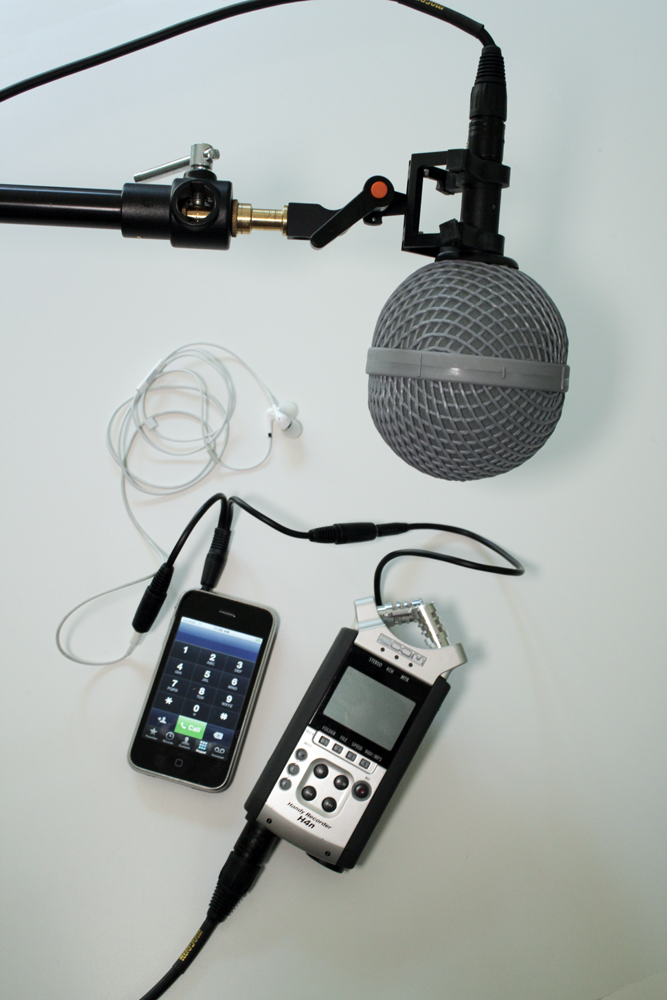
So here’s what you’ll need:

1. iPhone (with earbuds that have inline mic).
2. Zoom H4N.
3. A professional microphone that uses XLR jack (I used my Octava MK-012).
4. An XLR cable.
5. A 3.5mm jack splitter (part number 42-2570 at Radio Shack).
6. A 3.5mm male to 3.5mm male audio cable (part number 42-2497 at Radio Shack).

The xlr mic is necessary to record your voice; the splitter running from the phone to the Zoom records the voice of the person you’re talking to. (You might think that your voice would be included on the splitter line, since you’re talking on a mic that transmits via that line – but it’s not.

To configure the Zoom, set the recording mode to “4 Channel,” which allows you to record input from the 3.5mm jack on the back AND from the XLR jacks simultaneously. It’s totally professional because your voice and the voice of the person you’re speaking with are recorded onto separate tracks, which is ideal for editing later in Soundtrack Pro and Final Cut. You can control the recording levels independently as well.

NOTE: At first I thought I could get this to work even more simply by using the Zoom H4N’s built-in mics to record my outgoing audio. But the built in stereo mic is disabled when you plug in the 3.5mm external mic jack. Hence, the need to use an XLR mic to pick up your side of the conversation.

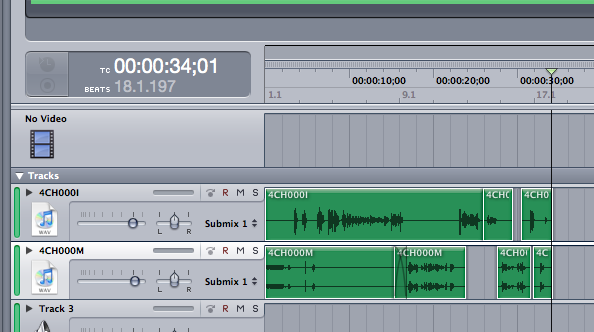
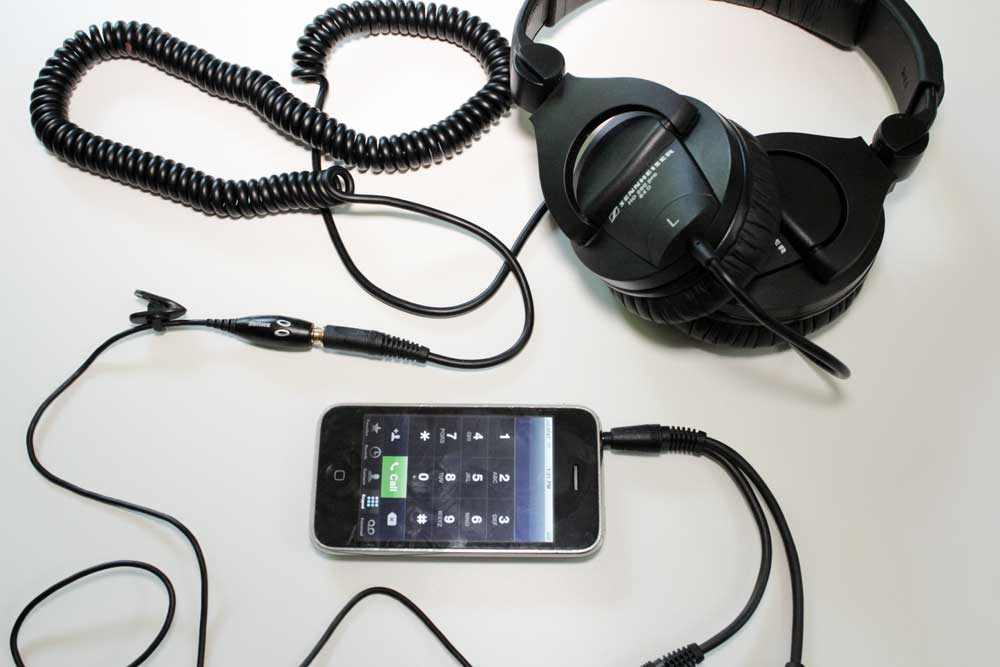
In this 30-second test conversation with my wife, which I edited in a very simple Soundtrack Pro multitrack project (see graphic), if you listen very carefully beginning halfway through, you can hear my wife’s voice being picked up by the very sensitive Octava mic from sound bleeding through from the earbuds. I replaced my earbuds partway through with proper Sennheiser 280 Pro circumaural headphones to keep any sound from spilling out, and for that you’ll need a third-party external mic such as the Shure Music Phone adapter. You can hear Lara telling me initially that it sounds like I’m on speaker phone when I’m using the Apple earbuds, but as soon as I hooked up the Shure, she noted a major improvement in sound.  So here’s a snapshot of my final setup for professionally recording iphone interviews, below.

Herzog's Rogue Film School

I feel deeply honored to be among the 60 participants selected to attend Werner Herzog’s second annual Rogue Film School, which will be held just outside of New York in mid June. More than any other filmmaker, Werner Herzog embodies the spirit of independence and lifelong dedication to craft that inspires me to make films. Herzog has made more than 60 films during his career, films that cross the line between documentary and narrative and push the genre forward in pursuit of what Herzog calls “ecstatic truth.” If you asked me who my living heros are, I’d say Barak Obama, Steve Jobs, Nelson Mandela, and Werner Herzog. Roger Ebert once called Herzog “the most curious of men,” concluding:

You and your work are unique and invaluable, and you ennoble the cinema when so many debase it. You have the audacity to believe that if you make a film about anything that interests you, it will interest us as well. And you have proven it.

I've seen the future of workshops: it's called CreativeLive

I spent the better part of last weekend virtually attending the 3-day CreativeLive video dslr workshop hosted by Vince Laforet. This workshop was different from any other workshop of its kind that I’ve attended in two ways:

  1. I was able to participate live, from my couch, viewing the workshop happenings on my 6-foot projected screen and posting questions via chat.
  2. It was FREE.

I could add a third item: I actually learned something from the workshop. Stuff that will immediately begin making me money on my next commercial shoot, which begins Wednesday.

The folks at CreativeLive have such a great thing going, that I felt terrible about NOT paying, because I was worried about them not making a financial success of their endeavor. So I opted to pay the $79 class fee, not because I necessarily need access to the materials, but because I want them to succeed. I want to see a LOT more workshops of this kind on topics like Final Cut editing, film lighting, creativity workshops with masters, and many more.

If you’re someone with a photography background looking to get up to speed on filmmaking, save yourself months of hassle and just take this workshop right now. Because oh yeah, if you didn’t make the live event? No problem – you can still take video DSLR workshop the same as if it were live – only more tightly edited – for $129. Deal.

Prepping interview audio for Final Cut using Soundtrack Pro's Limiter Filter

I’m still in the early stages of developing my style as a filmmaker, and one technique that I’m already noticing is becoming part of my style is to record audio and video separately in two takes. That is, have a sit-down with the interview subject in which there are no cameras present – just audio recording. This puts people at ease, because they can focus on what they are saying, not HOW they are saying it, or how they LOOK while saying it. I find it makes for more authenticity, and it’s nice to be able to focus on JUST getting great audio in this pass.

Then I schedule a second session with the subject, in which it’s all about the video. I DO record reference audio with a camera-mounted shotgun mic during this second session, but find I rarely use this audio.

Breaking these steps into two also allows me to do everything: I can run sound the first day with a boom pole, and work the camera the second day. Of course not all shoots allow for the luxury of two days of shooting, and I do work with a great sound guy who is a student at Art Institute of Seattle when needed. But at this point in my career, part of the joy of filmmaking is doing it all. I missed film school, so it’s the only way to learn.

Ok so back to the reason I made this post: Using this approach creates a big long audio file, usually about an hour long, with a lengthy interview, which I then carve up into the much briefer segments needed for the edit. Initially, I would drop the file into Final Cut, and slice and dice until it was about right, before sending it to Sound Track Pro for sweetening and repair.

The problem I run into, though, is that since I’m essentially working on the same big long clip, just sliced into different segments, FCP gets unhappy when I try to send individual clips over to Sound Track for repair.

The solution: Drop the whole audio file into FCP, then immediately, before you do anything, send it to Soundtrack (ctrl-click the audio file, then select “send to > soundtrack pro audio file project”). Then apply a Limiter filter to limit the dynamic range of the entire interview, which means the quiet bits will have more volume and the loud bits won’t be too loud. For the details of how to do this, follow this step-by-step tutorial from Larry Jordan on using the Soundtrack Pro Limiter Filter.

Starting with my audio more or less correct at the beginning of the editing process has helped me immensely to get the rest of the mix right, ie, music at approximately the right level, etc.

Vincent Laforet in Seattle for DSLR workshop beginning April 30

Master DSLR filmmaker Vincent Laforet will be in Seattle to teach a 3-day introduction to DSLR cinema that starts on April 30. If you’d like to participate live, there’s room for only 5 participants at $600 each, quite a value in itself. But what’s really cool about this workshop is that the entire thing will be streamed live, FREE. As tempting as live attendance is, I’m going to save the $600 and put it towards some of the amazing gear that Vincent will be demonstrating during the workshop, and listen in online.

Sign me up for that: http://creativelive.com/courses/vince_laforet/

How to recover missing and corrupted files on Canon DSLR like my T2i

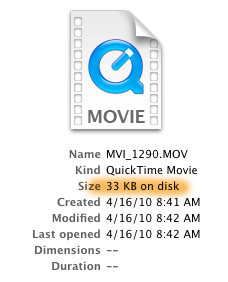
I had a potential disaster today: after returning from two big commercial shoots, which I shot with my T2i in 720p 60p, I popped in the 32 gb SD card with most of the morning’s work on it, and immediately came to the horrible realization that of more than 100 files on the card, only 6 were readable. The rest of the quicktime files were visible, but showed only 33 KB on disk for each of them. Obviously, something had gone horribly wrong.

I spent the next 7 hours researching all of the data recovery options available, initially without finding a solution (at one point I was so sure the data was gone for good that I contacted my client and told them I had to schedule a reshoot, never a fun conversation). But I kept trying the many tools available and finally found one that got my files back. So if you’re facing the same situation, read this first and hopefully you’ll be good to go a lot faster than I was.
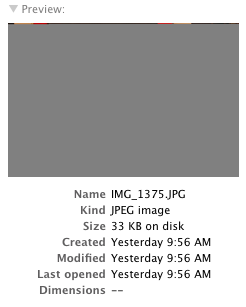
Two stills that I snapped during the shoot, which also showed up as 33KB files, I was able to open. However, only the first couple of lines of image data displayed – the rest was gray. Like this (see image to right).

Background: During my shoot this morning, my camera was overheating constantly – the little red temperature light was blinking like mad. But I’ve seen that before, enough not to worry about it – if it gets too hot, the camera just shuts down, cools off, and then you’re good to go in a few minutes. I had a perfect storm today: in addition to the overheating, the card got full and the battery died all at about the same time. All I remember is an error message displaying on the screen which said something to the effect of “Unable to save files to disk” and then it went black. I didn’t worry too much about it, because I’ve never had a problem before when the power dies on my T2i. But after today, I can tell you that I will very much worry about it. As best I can tell after researching this, it appears that the culprit for the lost data in my case was running out of power while shooting. Don’t let it happen to you. But if it does, all is not lost. Here’s how to resurrect your files.
I’ll spare you the long list of 7 demo software applications I downloaded and tried, without success, and just jump straight into the killer app that saved the day: Klix Digital Picture Recovery. This $29 piece of software is worth every penny, and then some. After scanning my sd card, it built a list of all of the missing files. However, it did NOT include a preview – which at first led me to believe the files were not recoverable. But in fact, they were.

The way I discovered this was by trying the nuclear option – a company called Aero Quartet that has a sweet piece of software for Mac that you can download to diagnose your broken Quicktime files, called Treasured. Treasured scans your damaged quicktime files, and tells you the odds that your file is repairable, and walks you through the steps of preparing it for submission to them, where a real human will look at your file, and attempt to salvage it. They will give you an estimate of how much this will cost automatically, and a real person will confirm it before you are charged.

In my case, one of the diagnostic screens said “surprisingly, your file can be opened in quicktime.” I was all, huh? It can? I went back to the saved Klix file, and sure enough, it opened just fine. Audio was perfect too. Whew!

I’m grateful that I didn’t have to use Treasured’s more expensive service this time, but I’m grateful for their help diagnosing my file issues and really glad to know it exists.

And the next time the battery starts blinking red on my Canon dslr, you can bet that I’ll be changing the batteries BEFORE it goes dead.

UPDATE: The same software also works if you accidentally format your card before downloading the files.

How NOT to use a Zoom H4N

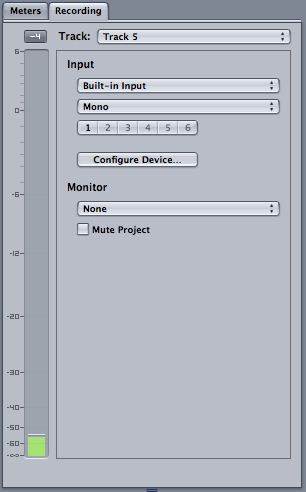
I’ve been happily using a Zoom H4N digital recorder since last October to record audio such as interviews. I use it primarily with a AT875 shotgun mic, which requires phantom power. It’s no problem, because the Zoom has a mode that provides it. But I’ve noticed the price you pay for using phantom power, at least with my AT875, is reduced battery life. WAY reduced. I generally can expect about two hours max of record time. And if you’re using rechargeable alkaline batteries, that drops to less than half an hour, as I discovered this morning.

But here’s a far worse discovery that I made today, which amounts to a serious design flaw with the Zoom: if you’re recording when the batteries die, you lose everything recorded on the clip up to that moment (it saves a 0 kb file, rather than a file with your data in it).

Bottom line: the Zoom H4n is a great recorder. Just don’t EVER let it run out of batteries, and it eats them like candy, at least if you’re using it with phantom power and an AT875.

First 5 minutes of Banksy film posted on YouTube

I can’t wait to see this film. It’s coming to Seattle’s Harvard Exit theater on April 23. This film is especially interesting because it’s being self-distributed, sort of, as much as that’s possible for someone whose identity is a secret. In any case, it’s coming to a theater near you, and if audience reaction at Sundance was any indication, it’s going to rock. Here’s the first 5 minutes:

Les plages d'Agnès | documentary 44 of 100

Watching this documentary is perhaps the closest thing possible to getting inside long-time French filmmaker Agnes Varda’s head without surgery. It’s a playful brain dump that skips through the memories of her long life in an avalanche of arty free association. “She has a way of never explaining very much,” wrote film critic Roger Ebert, “and yet somehow making it all clear.”

Synopsis: Agnes Varda, who at this time of this film was 80 years old, finds a way to tell her story that is as original and vivid as her own life. Constructed from family photos, snippets from her many films, and swept along by her irrepressible narrative, the bits of her story appear and vanish like bubbles in the sand. Old photos come to life in carefully reconstructions with young actresses, whom she sits beside, observing with a wry smile. The river of time flows deep through Varda’s live, pulling you along with it on a wild ride that encompasses many of the most significant events of the 20th Century.

Story structure: The film opens on the beach, where Varda is building a very artsy mirror assemblage, an apt visual metaphor for the film to come, in which Varda throws the pieces of her life into the kaleidascope of this film. After the loosely follows the path of her, chronicling major events such as her marriage to French filmmaker Jacques Demy. But equally resonant is the interior journey of the recollection itself, the inquiry leading her to surprising places in her mind, and like a tour guide, leading us, is Varda, sitting in a little sailboat, or walking shoeless on the beach. The story is told with her narration, in a train-of-consciousness style that allows her to wander freely to find connections that are real to her, and captivating to us.

Cinematography: The memorable scenes for me are the way still photographs were incorporated into the film. Varda, who was an accomplished photographer, uses pictures from her childhood layered with moving images to form moving, occasionally surreal and always stimulating visual juxtapositions. The opening mirror scene is also a keeper. The timelapse of suger cane cutters in Cuba is also memorable.

Editing: The stream of consciousness style of this film reminds me a little of “Fast, Cheap and Out of Control.” Only within one person’s head, not four.

Music and sound: The sound effects in the mural painting scene, such as pig snorting, registered.

Shine cast and crew screening revelations

Last night I invited 40 members of the cast and crew of Shine, my first short doc made with Ben Medina, as well as the biggest financial supporters of the film, to a private screening at Fremont Studios. It was also the first time I’ve seen the film on a biggish screen (30 feet or so), and the first time I’ve had the experience of showing a film to the people who are actually depicted in the film. I was a bit nervous, and I expected a wide range of responses. I wasn’t disappointed.

The good news is that by far, nearly everyone liked the film. The entrepreneurship experts in particular, like Connie Bourassa-Shaw and Steve Brilling, and Mark Lacas said they felt we struck just the right balance between hope and dreams vs. realities and failures of entrepreneurship. Chris Julian, who teaches film editing here in Seattle, said that at 24 minutes, we got the length just right for a film of this kind, too, and complimented me on the color grade, which I did myself with a lot of help from a handful of Red Giant Software plugins.

The theater screening revealed that the audio mix still needs work. What sounds great on my Sennheiser 280 headphones actually sounds VERY different on surround sound in a theater. Chris Julian tipped me off to using a good pair of external speakers when editing beats phones every time. Lesson learned.

Another reason I’m glad we screened the film to as many of the people featured in the film is because we were able to catch one huge mistake – I misspelled Connie Bourassa-Shaw’s last name! I can’t believe that made it past all of our rigorous checks. Luckily it’s easy to fix that before the film gets out.

One woman featured in the film objected to her face being shown so large (the film is built around close-up interviews with people looking directly into the camera). It was a little too intimate for her. And the fact that it was in HD meant that there’s no place to hide any blemishes. I really like that level of intimacy, and that’s not something I would change. But it’s an interesting observation about HD vs SD – HD can be a little TOO good for some people.

One of the entrepreneurs in the film sent his publicist to the screening, and she objected to the color grade I did on him, which really surprised me. I spent a lot of time making him look good, and in fact, Ben shot his interview to look positively glowing very intentionally. Film is a subjective medium, that’s for sure. Luckily for me, Chris Julian was standing nearby when she cornered me and backed me up on how good it in fact looks.

But the biggest revelation of the night came when someone who will remain unnamed here threw a temper tantrum after the film, in the hall outside the theater, objecting to not receiving a larger credit. That one really caught me by surprise.

Ultimately, making a film is a deeply subjective, personal process, and I’m deeply grateful for the opportunity to have collaborated with so many talented people in its making. It’s a true film. And I’m proud of it.

No word yet on whether it’ll get it’s public premier at SIFF – they have until the end of April to notify us. Fingers crossed!