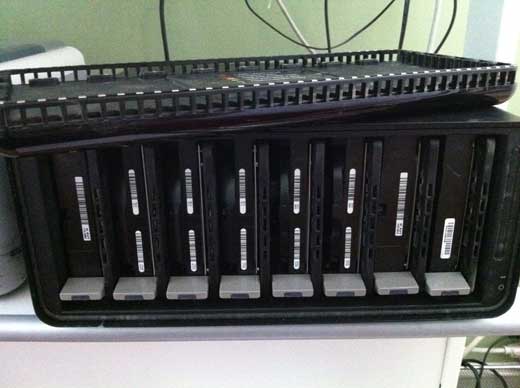
Major Drobo problem and speedy replacement from Data Robotics

Just when I thought it was safe to edit on my Drobo Pro…it up and dies on me. Weird things began happening not long after I connected the unit to my new iMac. As I was copying huge amounts of data using Final Cut X (which I was using to create proxy media of my entire film footage), Final Cut would sometimes freeze. Then the system would freeze, and I had to force-reboot more than once. With all the badmouthing Final Cut X has been getting, it was tempting for me to pile on and blame that.

But i had a sense that the Drobo was the culprit. Yesterday morning the fan on the unit went crazy, with all the red and blue lights on at the save time. The fan was on top speed, and would periodically go dark as if it were trying to restart. But it was stuck in an endless boot up loop.

I didn’t shell out the extra money for DroboCare, so I was stuck sending an email to tech support on a holiday. To my surprise, someone answered within an hour. Within a couple of email exchanges, they determined that the problem was fatal, and they would RMA me a new one. I’m grateful for that much, because I purchased mine 16 months ago – so it’s four months past the 1-year warranty that Drobo extends to US customers (EU customers get 2 years).

This morning they notified me that a new unit is on the way and will arrive Thursday via FedEx. I’m crossing my fingers that this one will work, and that all my data will be safe despite the unsafe shutdown it must have suffered when it went down. The nice thing about Drobo is that you can pull out all the old disks (what Drobo calls a “disk pack”) and insert them into the new box (with power off) and turn it on, and it should recognize everything as before. Wish me luck.

**UPDATE** My replacement Drobo Pro arrived within 48 hours. I followed the instructions: with both devices powered off, remove the media from the old drobo, and load it into the new drobo (disk order doesn’t matter, they say – but I put them back in the same order because I guess I’m superstitious that way). Then I stood back, and hit the power switch. Wait for it, wait for it…it works! All my data is safe, and the new Drobo is humming along nicely. I’ve copied several terabytes of data so far (yes, backing up my data to another set of external hard drives), and no problems. Average data transfer with iscsi seems to be somewhere around 60 Mbps, as measured by AJA System Test disk whack tool. My plan now is to try cutting my film on Drobo Pro, but when I can afford it to use Drobo Pro as backup and edit on a Thunderbolt RAID.
Drobo Pro actually can work for video editing – with the right machine

When I bought a Drobo Pro more than a year ago, I thought it was going to be the perfect solution to storing big files and editing them. With the Drobo Pro’s iscsi gigabit ethernet connector, it should be as fast as esata, which is plenty fast for editing HD video. But it didn’t end up so rosey: when I connected my 3-year-old MacBook Pro, iscsi never worked as advertised. In fact, it was slower than Firewire 800. Repeated support tickets were incapable of resolving the issue. So I was stuck using it as an archival storage server, rather than for editing on directly.

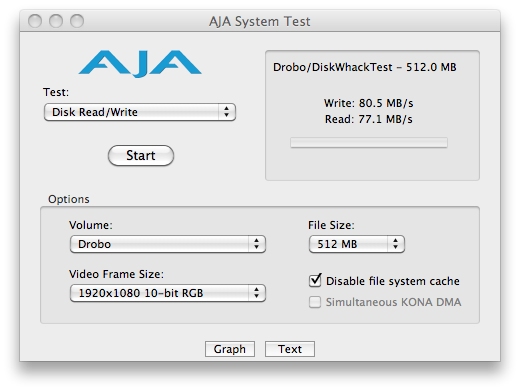
But yesterday, things changed. In preparation to cut my first feature film, I’ve purchased an iMac 27″ fully loaded war pony. And the thought occurred to me, as I saddled her up, to give Drobo iscsi one last chance. So I cabled it up, and boom, it works. Look at these numbers!

80 MB/s write times! 77 MB/s read times! It’s my editing dream come true. Well, actually, it’s what Drobo advertised when I bought the thing, but I’d come to expect much less from the company. I still wouldn’t recommend purchasing a Drobo Pro, because who knows whether it’ll work with YOUR machine. But today, at least, I am one happy boy, as I contemplate more than 3 terabytes of film and audio that I’ll be scrubbing, tagging, cutting, previewing, and rendering into a film without any storage bottlenecks.

And as for the iMac? Oh. My. God. It’s amazing. But that’s another post.

My first date with Final Cut Pro X

Ever since I heard that Apple was about to release a radically new version of Final Cut, I’ve had it in my head to cut my film Beyond Naked with it. And fate agreed: it was released on the same day that principal photography on my film ended. So today I sat down with FCPX to get acquainted.

The experts say you should take these things slowly. Cutting a feature film on a brand new Apple product is a bit like getting married after a single date. But I’m a confirmed early adopter, an Apple fan, and a bit of a romantic. So I’m going for it. I’ll let you know how it goes.

My first impression was to scratch my head. The interface is different. Really different. I had to spend about three hours with it before the lights began to blink on. But once they did, I can see why the new version is going to be killer. In descending order, here’s what blows me away:

1. Storyline vs. Timeline. The old timeline is history, replaced by a single “storyline” that everything magically drops into and stays connected with. No more keeping track of layers and layers of stuff: it’s all on the same line! Now, to layer something above or below the main clip, you do something called a Connect edit. That joins the clip you’re adding to the storyline. Do a couple of these and you’ll wonder how you ever did it the old way.

2. Audio sync: ahhhh, so easy to connect zoom audio with dslr reference audio for individual clips. And just as easy to drop out the reference and bring up the zoom audio, or to mix them together. But so far I don’t see a way to sync multiple clips at the same time, as you can with pluraleyes.

3. Events and metadata: In the old Final Cut, it was possible to log everything, put in notes about takes, label them, etc. But I never did any of that. Did you? Well, on this new version you will. Some of it’s done automatically for you, like recognizing what type of shot you’ve got, how many people are in it, and more. And tagging is a snap, and it’s so heavily incorporated into the interface that you find yourself wanting to tag everything. You can even tag a section of a clip, which creates something like a subclip.

I’ll have more to report as I get deeper into it. But after the first date, I’m confident this is going to be a love story.

It's a wrap

Last scene in Beyond Naked

As the sun lingered above the horizon on the longest day of the year, we filmed the final scene in Beyond Naked. Golden Gardens seemed like a fitting place to say goodbye to each other, and hello to summer.

It feels like we’ve come such a long way together. From the stillness of the opening scene shot six months ago on Dec. 21, to the thunderous climax of the Solstice Parade last Saturday, we’ve followed the arc of the sun. As it turns a corner, so do we.

By coincidence, Apple released a long-anticipated new version of Final Cut Pro, the editing software we’ll be using to cut this film, on the same day. It’s time for Lisa and I to put down our cameras, and put on our editing hats.

What sort of story will we find in the footage? We had help on Saturday from 42 amazing volunteers, who shot hours of yet unseen footage, which is freshly stored on our hard drives, like a present waiting to be opened. From inside that footage, as the sun travels south, we’ll pull the threads story. And on December 21, this film will be completed. And the sun will start this way once more.

I want to thank everyone who helped make this film: the four brave people we’ve been following, the dozens of people who helped cover the parade, and the 166 backers who funded our successful Kickstarter campaign. When it’s finished, I hope it makes you laugh, and cry, and more willing to do one thing every day that scares you.

I'm Feeling Beyond Naked

Yesterday afternoon, as my small crew and I calculated how much money and time separated us from our Kickstarter campaign fundraising goal, one thing became strikingly clear: it was time for action. Facebook posts weren’t going to get the job done alone. So my crew decided that it was time for their director to hit the streets.

This made me deeply uncomfortable. I’d rather ride naked in front of 100,000 people than beg for money. But my crew was insistent: you have to do something. So I picked up the sign they made for me, and hit the street on the same spot where, in a few days, hundreds of naked cyclists will be riding.

Out there, I felt naked. Beyond naked. Which, as I think about it, I’m glad I got to experience. After all, this is a film about four people willing to push themselves beyond their comfort zone.

So today, with 60 hours remaining in our campaign, I’m asking you to join me in the uncomfortable space that remains and help me close the gap. We are nearly 80 percent of the way there! We can totally do this, and make a film that all of us will be proud to say “I helped fund that film.”

La Figa book hot off the press

My friend, James Beard award-winning chef Tiberio Simone, announced this morning that his book is available for pre-order. This is a project I had the privilege of filming several times during its 5-year development, and a book that I’m looking forward to giving a home on my living room table. Congratulations to Matt Freedman, the photographer, and Tiberio. You did it!

Last of four riders accepts challenge to ride in Beyond Naked film

The documentary film I’m currently making passed a milestone yesterday. With two months go until the Fremont Solstice Parade, we found the fourth and final rider willing to accept our challenge to ride naked in the parade. Emily Resling’s father died suddenly last year, and the joy vanished from her life. She hopes that being part of this film will help her get it back. So do I.

Shallow thinking has it's limits

I was in Portland this weekend, celebrating my birthday with my wife Lara. We spent some time discovering great little places like M Bar. I was carrying my iPhone 4 and my Canon 60D. When I had my “serious photographer” hat on, I shot with the 60D. When I was just fooling around, I shot with the iPhone. And guess what? I like a lot of the iPhone snaps better.

Here’s a couple of photos that illustrate the point. Exhibit A is a photo I took with my 60D through the window of a bar (consciously trying to make a good picture). Exhibit B is shot with iPhone, and I was just messing around (subconsciously trying to make a good picture). Which do you like better?

Exhibit A:

Exhibit B:

I like ’em both for different reasons, but if I had to choose between the two, I’d pick B any day. There’s just a lot more going on that’s interesting to look at. A is a quick-read; B is a deep read. It’s the thinker’s pick. And when it comes to photography, I like thinking deep.

Problem is, for some reason, whenever I have a 2.8 lens on my DSLR, I think shallow. Both pictures present different challenges: A is easy to compose, but harder to get critical focus. B is a piece of cake to focus, but much harder to compose and pick just the right moment to snap the picture.

This is a reminder to me that all that camera gear is supposed to work for you, not think for you. What I hope to take away from this is a reminder that there’s a big aperture dial on all DSLRs. And it’s important to use the big numbers as often as the little ones.